7 Design Tips for Crafting Immersive Portfolios for Photographers Using 3D Websites
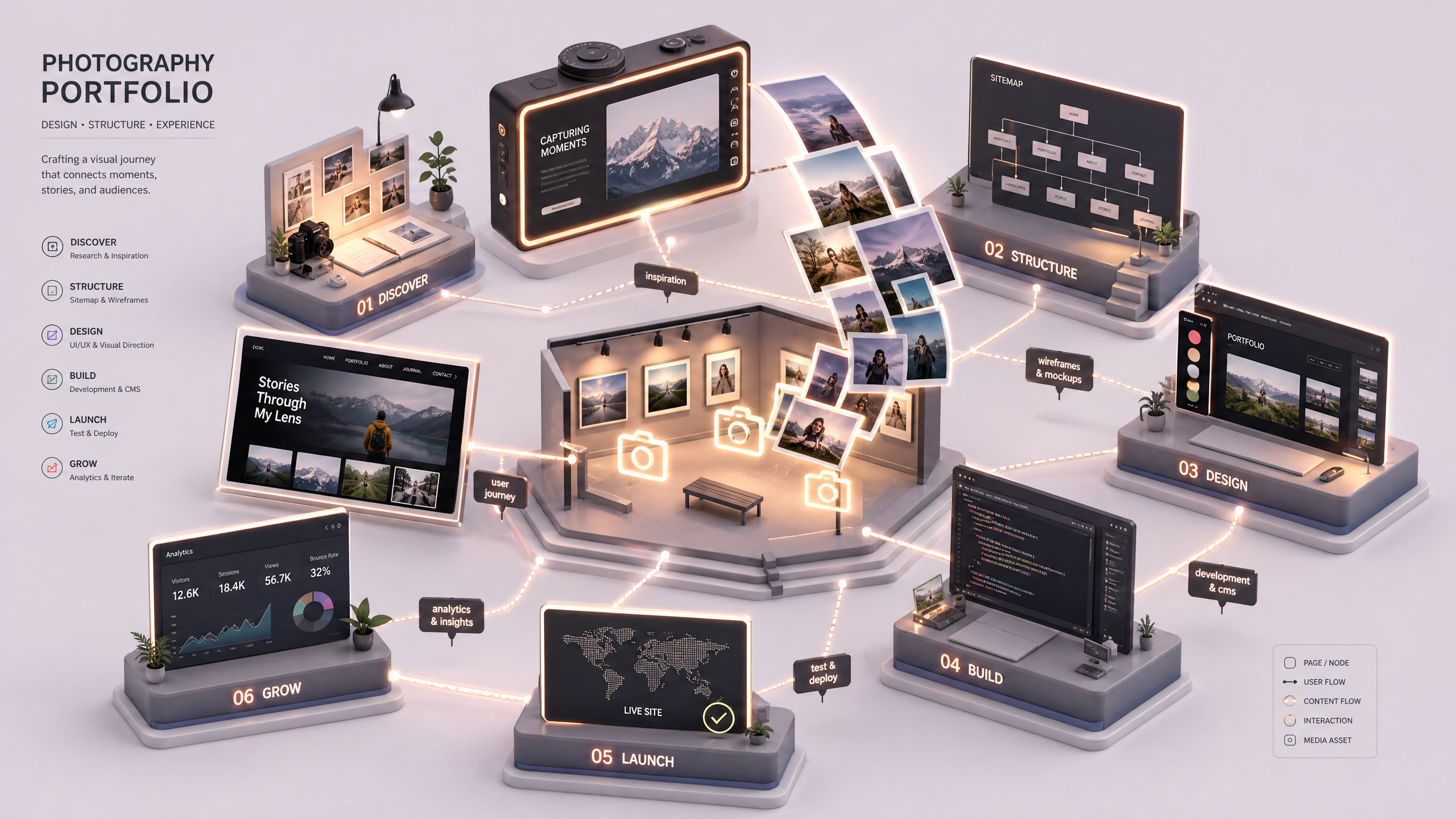
Creating a portfolio that captures the essence of your photography style is more than displaying images—it's about telling a story. With Draftly's AI-powered 3D website builder at your fingertips, you can transform your portfolio into an interactive visual experience that wows clients and showcases your work like never before. Here’s your step-by-step guide for designing immersive 3D portfolios for photographers.
Why Choose 3D Websites for Photography Portfolios?
A traditional portfolio may display your work, but a 3D website lets clients experience it. With dynamic scrolling, interactive galleries, and cinematic transitions, 3D portfolios offer a modern and engaging way to showcase your creativity.
!7 design tips for crafting immersive portfolios for photographers, tutorials
- 3D design increases user engagement by up to 47%, according to industry reports.
- Interactive portfolios help brands stand out in markets saturated with static, 2D websites.
- They create a more immersive experience, simulating real-world interactions in digital space.
Step 1: Plan Your Portfolio’s Storyline
The most captivating portfolios tell a story. Your narrative could be about your journey as a photographer, your artistic style, or a thematic collection.
Tips for Structuring Your Story
- Define your theme: Whether it’s weddings, landscapes, or portraits, center your portfolio around a cohesive theme.
- Divide into chapters: Organize sections based on time, location, or project type.
- End on a high note: Include your most striking images at the end to leave a lasting impression.
Step 2: Choose Interactive 3D Features
Using 3D design elements can elevate the viewer experience. Draftly offers a variety of cinematic features to help you transform your portfolio into an immersive journey.
- Scroll-driven animations: Gradually reveal images as users scroll.
- Lightbox galleries: Allow users to zoom into high-resolution images.
- Parallax effects: Add depth to your photography through layers.
- Transitions: Use fade-ins, slides, or rotations to make your portfolio dynamic.
Step 3: Optimize Image Presentation
Your photographs are the heart of your portfolio, so their presentation must be flawless.
Practical Design Tips for Photos
- Resolution matters: Ensure all images are at least 1920x1080px for optimal clarity.
- Use color grading: Apply consistent tones across a collection for a unified aesthetic.
- Dynamic layouts: Opt for a mix of full-screen images and collage grids.
- Hover effects: Add subtle hover interactions to make the experience more tactile.
Step 4: Leverage Cinematic Storytelling
A 3D portfolio allows you to go beyond static images by embedding elements like video, background music, and motion graphics.
- Video backgrounds: Show behind-the-scenes footage or time-lapse photography.
- Ambient sounds: Include soft soundtracks that complement the mood of your images.
- Captions and context: Briefly describe the story behind each photo or series.
Step 5: Add Personalized Touches
Your portfolio should reflect your personality and brand. Use customization tools to make it truly yours.
- Custom fonts and colors: Highlight your unique style; check this guide for customization tips.
- Self-portrait or bio page: Include a short story of your journey in photography.
- Call-to-action (CTA): Encourage visitors to inquire about bookings or collaborations.
Step 6: Ensure Mobile Responsiveness
Did you know that more than 70% of website traffic comes from mobile devices? Your portfolio must look impeccable on smartphones and tablets.
Steps to Optimize for Mobile
- Test the layout: Use Draftly’s preview features to view your site on multiple devices.
- Prioritize speed: Compress images without losing quality to improve load times.
- Clickable CTAs: Make sure buttons are easy to tap.
Step 7: Use Analytics for Continuous Improvement
Once your portfolio is live, use analytics tools to understand user behavior and improve.
- Track engagement: Measure time spent on pages and interaction rates.
- Identify drop-offs: Pinpoint sections where users lose interest.
- Refine your design: Use data insights to tweak your layout and features.