Using AI 3D Websites to Attract Clients for Personal Trainers and Gyms
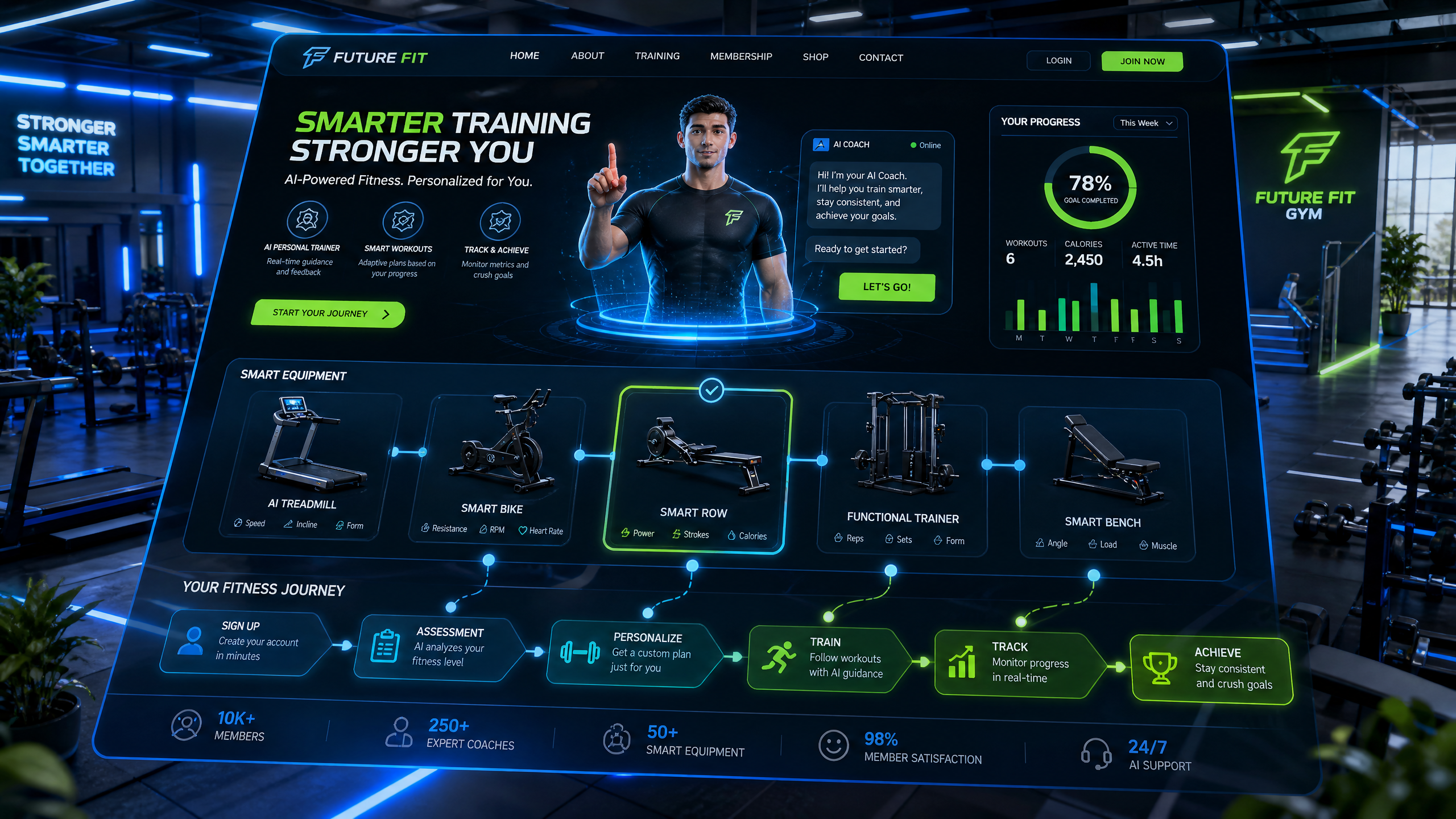
In the competitive fitness industry, standing out is crucial. Whether you're a personal trainer or running a gym, an AI-powered 3D website can set you apart. With interactive features, immersive visuals, and seamless user experiences, these websites can help you attract clients and boost memberships.
Here’s a step-by-step guide to creating an AI 3D website that will elevate your fitness business and captivate potential clients.
Why Personal Trainers and Gyms Need AI 3D Websites
The fitness industry is crowded, but a 3D AI-powered website can give you an edge. It's not just about looking modern; it's about creating an engaging experience that converts visitors into loyal clients.
!using ai 3d websites to attract clients for personal trainers and gyms, tutorials
- Interactive features like virtual gym tours and workout demonstrations build trust.
- Immersive visuals create an emotional connection, making clients more likely to choose you over competitors.
- Personalized client engagement, such as AI-driven fitness recommendations, cultivates loyalty.
Step 1: Define Your Website Goals
Before diving into design, it’s critical to clarify your objectives. What do you want your website to achieve?
- Attract new clients: Focus on showcasing your services and client success stories.
- Retain existing clients: Include member portals for booking classes or tracking progress.
- Build your brand: Use 3D elements to reflect your gym’s unique personality or your training philosophy.
Step 2: Create an Immersive Homepage
Your homepage is your first impression. With Draftly, you can easily create a stunning cinematic, scroll-driven homepage that immediately grabs attention.
Key Features for Your Homepage
- 3D Welcome Animation: Use AI to generate a dynamic animation of your gym or training session. This could include a rotating 3D model of your facility or a trainer in action.
- Interactive Fitness Goals Quiz: Embed a quick quiz that helps visitors identify their fitness goals and offers them tailored program suggestions. For more ideas, check out our guide to real-time interactive features.
- Before-and-After Showcases: Display 3D before-and-after transformations of real clients to build trust. Here’s how to showcase transformation projects effectively: How to Use 3D AI Websites to Showcase Before-and-After Projects.
Step 3: Develop Engaging Service Pages
Your service pages should go beyond simple descriptions. Use 3D visuals and AI features to give users an interactive experience that mirrors the energy and value of your services.
- Virtual Gym Tour: Create a 3D walkthrough of your gym, highlighting equipment, classes, and amenities. This is especially useful for clients who want to explore your gym before visiting.
- Trainer Profiles: Feature interactive 3D profiles for each trainer, including a video introduction, certifications, and specialties. Learn how to design immersive trainer profiles.
- Pricing Tables in 3D: Showcase pricing options in an attractive, easy-to-navigate 3D format to make choosing a plan seamless.
Adding Storytelling through 3D
Stories are powerful. Use short, 3D-animated client testimonials or show a day in the life at your gym. Highlight success stories and specific results your training programs have achieved.
- Choose a client success story to feature.
- Use Draftly to create a scroll-driven timeline of their journey.
- Include metrics like weight loss, strength gains, or improved endurance for credibility.
Step 4: Include Conversion-Driven Features
Getting visitors to take action is the ultimate goal. Leverage Draftly’s AI tools to create features that boost conversions.
- Call-to-Action Buttons: Add bold, strategically placed CTAs like “Book a Free Session” or “Join Our Gym Today.”
- Interactive Appointment Booking: Let potential clients schedule consultations directly from your site with an AI-enabled booking tool.
- Membership Calculators: Allow users to calculate membership costs based on their needs.
Step 5: Optimize for Mobile and Search
Most potential clients will visit your site from their phones. Ensure your 3D AI website is mobile-friendly and optimized for search engines.
- Responsive Design: Draftly ensures your 3D elements adjust seamlessly to any screen size.
- SEO Best Practices: Use keywords like “personal trainer near me” or “gym memberships in [your city].” Include local SEO features like Google Maps integration.
- Fast Loading Times: Compress 3D assets to ensure your site loads quickly, as 53% of users abandon a site if it takes more than 3 seconds to load.
Step 6: Test and Launch Your Website
Testing is critical to ensure your AI 3D website delivers a flawless user experience.
- Use Draftly’s preview tool to test both desktop and mobile versions.
- Check all interactive features, such as booking forms and virtual tours, for functionality.
- Launch your site and monitor performance using analytics tools to see what visitors engage with most.